
new GuideLine()
protected
- See:
-
- DigitalTwinAPI#guideLine
Extends
Methods
-
add(data, fn)
-
添加一个或多个GuideLine对象
如何获取自定义材质路径(material)见如下动图:
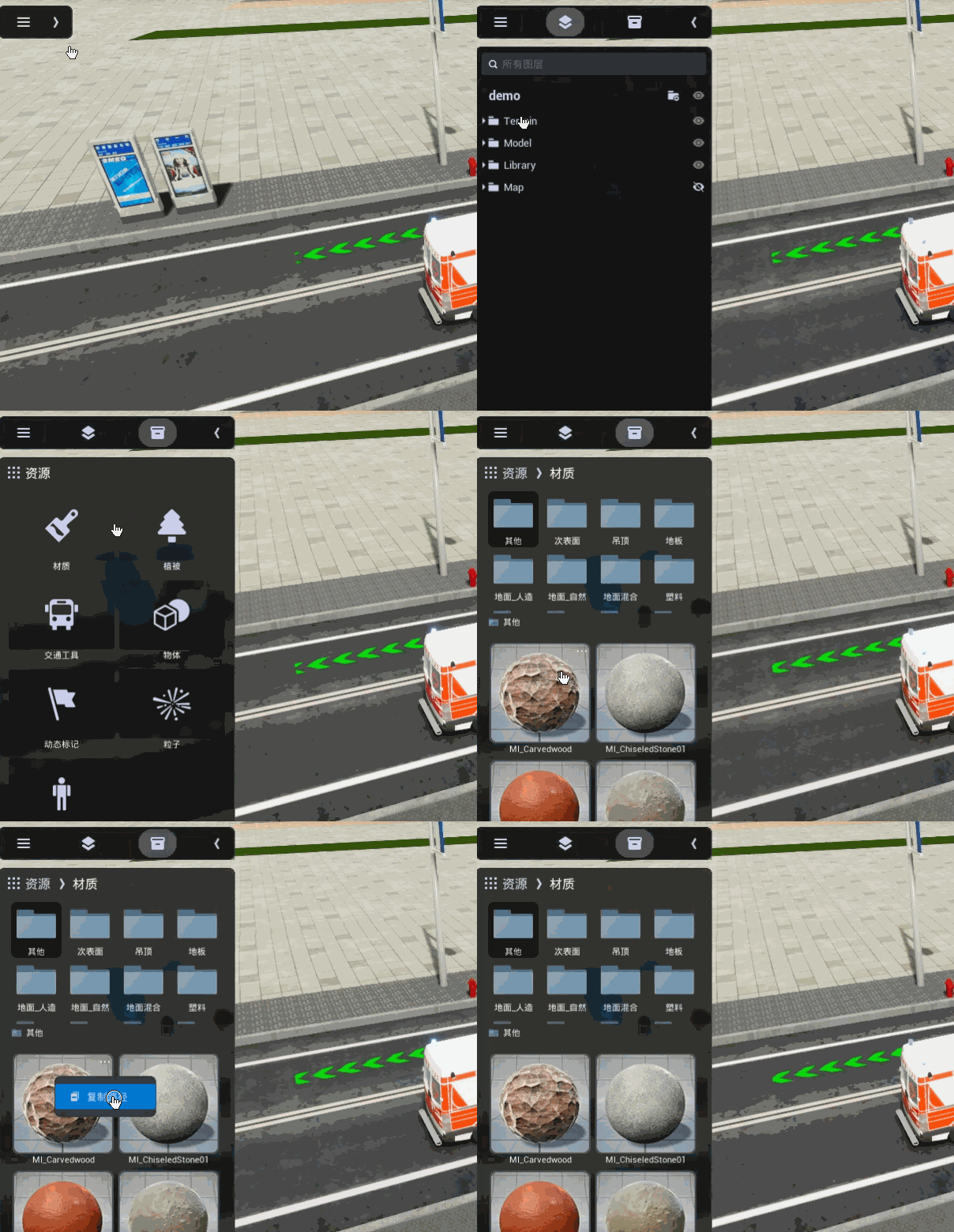
如何获取自定义材质包含的参数请调用如下方法:
let res = await fdapi.misc.getMaterial(material);
let params = res.data[0].params;Parameters:
Name Type Description dataobject | array 数据结构,支持对象或数组,对于每一个对象支持以下属性:
-
id (string) 字符串类型的ID
-
groupId (string) 可选,Group分组
-
userData (string) 可选,用户自定义数据
-
coordinates (array) 坐标点数组,取值示例
-
coordinateType (number) 坐标系类型,取值范围:0为Projection类型,1为WGS84类型,2为火星坐标系(GCJ02),3为百度坐标系(BD09),默认值:0
-
range (array) 可视范围: [近裁距离, 远裁距离],近裁/远裁取值范围: [0, 2000000],默认值:[0, 1000000],
-
depthTest (boolean) 是否做深度检测,true会被遮挡,false不会被遮挡,默认值:true
-
shape (number) 引导线样式,取值范围:[0,1],0:直线, 1:曲线,默认值:0,注意:设置为曲线坐标点多的时候会影响添加添加效率
-
width (number) 引导线宽度,单位:米,取值范围:[0~1000000],默认值:30
-
guideSize (number) 引导线动画对象的尺寸,单位:米,取值范围:[0~1000000],默认值:30
-
speed (number) 引导线动画播放的速率,单位:米/秒,取值范围:[0~100],默认值:10
-
interval (number) 引导动画播放的时间间隔,单位:秒,取值范围:[-1~20],默认值:-1,不循环播放
-
style (object) 引导线包含的起点、终点和折线的样式,结构如下:
startPoint (object) 起点样式对象,支持以下属性:
material (string) 可选参数,自定义材质路径,即资源库PAK文件里材质文件的路径,设置自定义材质参数后材质默认参数会失效
scalarParameters (array) 可选参数,仅在设置自定义材质路径后生效,自定义材质数值类型参数,包含name/value键值对的数组,其中value为数值,格式示例:[{"name":"不透明度","value":0.5},{"name":"UV重复","value":1.0}]
name (string) 材质包含的数值参数名称
value (number) 材质包含的数值参数名称对应的数值
vectorParameters (array) 可选参数,仅在设置自定义材质路径后生效,自定义材质数组类型参数,包含name/value键值对的数组,其中value为数组,格式示例:[{"name":"color1","value":[1,1,1,1]},{"name":"color2","value":[1,0,0,1]}]
name (string) 材质包含的数组参数名称
value (array) 材质包含的数组参数名称对应的数组值,一般是颜色数组:[r, g, b, a]
polyline (object) 起点样式对象,支持以下属性:
material (string) 可选参数,自定义材质路径,即资源库PAK文件里材质文件的路径,设置自定义材质参数后默认材质参数会失效
scalarParameters (array) 可选参数,仅在设置自定义材质路径后生效,自定义材质数值类型参数,包含name/value键值对的数组,其中value为数值,格式示例:[{"name":"不透明度","value":0.5},{"name":"UV重复","value":1.0}]
name (string) 材质包含的数值参数名称
value (number) 材质包含的数值参数名称对应的数值
vectorParameters (array) 可选参数,仅在设置自定义材质路径后生效,自定义材质数组类型参数,包含name/value键值对的数组,其中value为数组,格式示例:[{"name":"color1","value":[1,1,1,1]},{"name":"color2","value":[1,0,0,1]}]
name (string) 材质包含的数组参数名称
value (array) 材质包含的数组参数名称对应的数组值,一般是颜色数组:[r, g, b, a]
endPoint (object) 起点样式对象,支持以下属性:
material (string) 可选参数,自定义材质路径,即资源库PAK文件里材质文件的路径,设置自定义材质参数后默认材质参数会失效
scalarParameters (array) 可选参数,仅在设置自定义材质路径后生效,自定义材质数值类型参数,包含name/value键值对的数组,其中value为数值,格式示例:[{"name":"不透明度","value":0.5},{"name":"UV重复","value":1.0}]
name (string) 材质包含的数值参数名称
value (number) 材质包含的数值参数名称对应的数值
vectorParameters (array) 可选参数,仅在设置自定义材质路径后生效,自定义材质数组类型参数,包含name/value键值对的数组,其中value为数组,格式示例:[{"name":"color1","value":[1,1,1,1]},{"name":"color2","value":[1,0,0,1]}]
name (string) 材质包含的数组参数名称
value (array) 材质包含的数组参数名称对应的数组值,一般是颜色数组:[r, g, b, a]
fnfunction 可选的回调函数,请参考二次开发:异步接口调用方式
Example
GuideLine对象结构参考代码: { "id": "g1", "coordinates": [ [ 493210.2025, 2488496.863125, -0.0026171875 ], [ 493173.76, 2488761.5340625, -0.00078125 ], [ 493387.823125, 2488773.4715625, -0.0198046875 ], [ 493347.726875, 2489081.4201562502, -0.0143359375 ], [ 493138.6775, 2489075.9435937502, -0.000078125 ] ], "depthTest": false, "range": [ 0, 100000 ], "width": 1, "guideSize": 1, "speed": 20, "shape": 0, "interval": 1, "style": { "startPoint": { "material": "/JC_CustomAssets/PolylineLibrary/GuideExhibition/空", }, "endPoint": { "material": "/JC_CustomAssets/PolylineLibrary/GuideExhibition/空", }, "polyline": { "material": "/JC_CustomAssets/PolylineLibrary/Exhibition/混合线_9", "scalarParameters": [ { "name": "不透明度", "value": 0.5 }, { "name": "亮度1", "value": 10 }, { "name": "亮度2", "value": 1 } ], "vectorParameters": [ { "name": "颜色1", "value": [ 0, 0.269323, 0.53125, 1 ] }, { "name": "颜色2", "value": [ 0, 0.142583, 0.28125, 1 ] } ] } } } -
-
clear(fn)
-
清空场景中所有的GuideLine
Parameters:
Name Type Description fnfunction 可选的回调函数,请参考二次开发:异步接口调用方式
-
delete(ids, fn)
-
删除一个或多个GuideLine对象
Parameters:
Name Type Description idsstring | array 要删除的GuideLine对象的ID或者ID数组(可以删除一个或者多个)
fnfunction 可选的回调函数,请参考二次开发:异步接口调用方式
-
focus(ids, distance, flyTime, rotation, fn)
-
自动定位到合适的观察距离
Parameters:
Name Type Description idsstring | array GuideLine对象的ID或者ID数组
distancenumber 可选参数,观察点距离目标点(被拍摄物体)的距离,取值范围:[0.01~任意正数],如果设置为0或者不设置,系统自动计算
flyTimenumber 可选参数,相机飞行的时间,取值范围:[0~任意正数],单位:秒,默认值2秒
rotationarray 可选参数,相机旋转的欧拉角:[Pitch,Yaw,Roll],数组元素类型:(number),取值范围:Pitch[-90~90] Yaw[-180~180] Roll[0]
fnfunction 可选的回调函数,请参考二次开发:异步接口调用方式
-
get(ids, fn)
-
根据ID获取GuideLine的详细信息
Parameters:
Name Type Description idsstring | array 要获取的GuideLine对象ID或者ID数组(可以获取一个或者多个)
fnfunction 可选的回调函数,请参考二次开发:异步接口调用方式
-
hide(ids, fn)
-
隐藏GuideLine
Parameters:
Name Type Description idsstring | array GuideLine对象的ID或者ID数组
fnfunction 可选的回调函数,请参考二次开发:异步接口调用方式
-
setCoordinates(id, newVal, fn)
-
设置坐标值
Parameters:
Name Type Description idstring 字符串类型的ID
newValarray 新坐标值,取值示例
fnfunction 可选的回调函数,请参考二次开发:异步接口调用方式
-
setDepthTest(id, newVal, fn)
-
设置是否做深度检测
Parameters:
Name Type Description idstring 字符串类型的ID
newValboolean 是否做深度检测
fnfunction 可选的回调函数,请参考二次开发:异步接口调用方式
-
setGuideSize(id, newVal, fn)
-
设置新的引导对象大小
Parameters:
Name Type Description idstring 字符串类型的ID
newValColor 新的引导对象大小
fnfunction 可选的回调函数,请参考二次开发:异步接口调用方式
-
setInterval(id, newVal, fn)
-
设置新的播放时间间隔
Parameters:
Name Type Description idstring 字符串类型的ID
newValnumber 新值
fnfunction 可选的回调函数,请参考二次开发:异步接口调用方式
-
setRange(id, min, max, fn)
-
设置GuideLine对象的可视范围
Parameters:
Name Type Description idstring GuideLine对象的ID
minnumber 可视范围最小值,取值范围:[任意负数~任意正数],单位:米
maxnumber 可视范围最大值,取值范围:[任意负数~任意正数],单位:米
fnfunction 可选的回调函数,请参考二次开发:异步接口调用方式
-
setShape(id, newVal, fn)
-
设置新的shape样式
Parameters:
Name Type Description idstring 字符串类型的ID
newValnumber 新值, 0: 直线, 1: 曲线
fnfunction 可选的回调函数,请参考二次开发:异步接口调用方式
-
setSpeed(id, newVal, fn)
-
设置新的速率
Parameters:
Name Type Description idstring 字符串类型的ID
newValnumber 新速率值
fnfunction 可选的回调函数,请参考二次开发:异步接口调用方式
-
setWidth(id, newVal, fn)
-
设置新的宽度
Parameters:
Name Type Description idstring 字符串类型的ID
newValnumber 新值
fnfunction 可选的回调函数,请参考二次开发:异步接口调用方式
-
show(ids, fn)
-
显示GuideLine
Parameters:
Name Type Description idsstring | array GuideLine对象的ID或者ID数组
fnfunction 可选的回调函数,请参考二次开发:异步接口调用方式
-
update(data, fn)
-
修改一个或多个GuideLine对象
Parameters:
Name Type Description dataobject | array 数据结构,请参考add方法
fnfunction 可选的回调函数,请参考二次开发:异步接口调用方式
-
updateBegin()
-
用于批量多次修改对象的属性
在开始修改之前调用updateBegin,然后可以多次调用setXXX方法,最后调用updateEnd提交修改更新数据
注意:
updateBegin不是异步调用,不需要await,也没有回调函数参数- Inherited From:
- Overrides:
Example
fdapi.xxx.updateBegin(); for (let i = 0; i < 1000; i++) { fdapi.xxx.setColor(i, Color.Yellow); } fdapi.xxx.updateEnd(function () { log('update finished!'); }); -
updateEnd(fn)
-
用于批量多次修改对象的属性,与updateBegin配套使用
注意:
updateEnd是异步调用,可以用回调函数也可以awaitParameters:
Name Type Description fnfunction 可选的回调函数,请参考二次开发:异步接口调用方式
- Inherited From:
- Overrides: